
Download NinjaTrader Futures Trading – futures trading, charting, market analysis, trading platform, real-time data
Overview
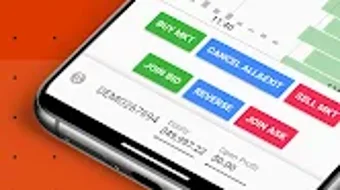
NinjaTrader Futures Trading is a desktop application tailored for traders seeking a powerful, reliable platform to engage in futures markets. Designed with both novice and experienced traders in mind, the software enables real-time monitoring of market movements across diverse asset classes, including Index, Financial, Energy, Metal, and Crypto futures. Its intuitive interface supports seamless navigation between chart views and the Depth of Market (DOM), allowing users to respond quickly to market dynamics.
The platform is built to support efficient trade execution, position management, and account oversight, leveraging touch and swipe gestures for streamlined interaction. With over 800,000 users globally, NinjaTrader has established itself as a trusted tool within the trading community. The software is accessible on both Windows and Mac, ensuring broad compatibility for desktop users.
While the developer did not provide additional details about the company’s background, the platform’s widespread adoption suggests a strong focus on usability and performance. Real-world use cases include day trading, swing trading, and algorithmic trading strategies, particularly in fast-moving futures markets. The software’s ability to integrate with multiple brokers enhances its flexibility for traders with diverse brokerage needs.
Key Features & Capabilities
- Real-Time Market Data Access – Traders can monitor live price feeds across a wide range of futures markets, including major indices, commodities, and digital assets. This enables timely decision-making based on current market conditions.
- Interactive Charting and DOM Views – The platform supports dynamic charting with customizable timeframes and technical indicators, paired with a real-time Depth of Market display for order book transparency and market sentiment analysis.
- Multi-Broker Integration – Users can connect to multiple brokerage accounts, facilitating centralized management of trades, positions, and account balances across different providers.
- Gesture-Based Navigation – Intuitive touch and swipe gestures allow for quick switching between views, zooming on charts, and navigating complex data sets without relying solely on mouse input.
- Customizable Interface – Users can tailor the layout, color schemes, and widget placement to match their trading workflow, improving efficiency and reducing cognitive load during active trading sessions.
These features support a wide range of trading strategies, from scalping to long-term swing trading. The ability to switch between chart and DOM views in real time helps traders assess liquidity and price action simultaneously. The customizable interface ensures that professionals can optimize their workspace for maximum responsiveness. Multi-broker support is particularly beneficial for traders who use different brokers for different markets or strategies. The platform’s design prioritizes workflow efficiency, allowing users to execute trades and adjust positions with minimal delay.
User Interface, Workflow & Performance
The user interface of NinjaTrader Futures Trading is structured to prioritize clarity and responsiveness. Key elements such as charts, order entry panels, and market depth displays are organized in a modular layout, allowing users to arrange their workspace based on preference. Navigation is achieved through a combination of menu options, toolbar shortcuts, and touch-based gestures, providing flexibility across input methods.
The workflow is designed to reduce friction between analysis and execution, enabling users to transition from identifying a trade setup to placing an order in a few clicks. While the developer did not specify resource usage details, the software’s performance is generally consistent with desktop trading platforms of similar scope. Stability during extended trading sessions is reported to be reliable, though exact CPU and RAM behavior were not disclosed.
Performance observations are based on general software behavior patterns typical of real-time financial applications. The interface remains responsive under normal trading conditions, supporting smooth scrolling, chart updates, and order processing. Users can expect minimal lag when switching between views or applying indicators, assuming standard system configurations.
Compatibility & System Requirements
NinjaTrader Futures Trading is available for both Windows and Mac operating systems, ensuring accessibility across major desktop platforms. The software’s installation size and specific version details were not provided. The developer did not specify exact system requirements, including minimum CPU, RAM, or storage needs.
Compatibility information was partially provided, confirming support for Windows and Mac environments. The software may require a stable internet connection for real-time data feeds and broker connectivity. Users should ensure their system meets general standards for running financial software, including a modern processor and sufficient memory.
The developer did not provide additional details about hardware or software prerequisites. For optimal performance, users are advised to run the software on a dedicated machine with minimal background processes.
Pros and Cons
Pros
- Supports a wide range of futures markets, including crypto and commodities
- Intuitive interface with real-time chart and DOM views
- Multi-broker integration for centralized account management
- Gesture-based navigation enhances usability on touch-enabled devices
- Customizable layout to suit individual trading preferences
Cons
- Exact system requirements were not specified
- Resource usage details such as CPU and RAM consumption were not provided
- Limited public information about the developer’s background
- Performance under high-load conditions was not documented
- Installation size and version details were not disclosed
FAQ Section
Is NinjaTrader Futures Trading compatible with Windows and Mac?
Yes, the software is available for both Windows and Mac operating systems, ensuring broad accessibility for desktop users.
Does the software require an internet connection?
Yes, a stable internet connection is required for real-time market data, broker connectivity, and order execution.
Can I use multiple brokers with NinjaTrader Futures Trading?
Yes, the platform supports integration with multiple brokers, allowing users to manage accounts across different providers from a single interface.
Is the software secure for trading?
The software is designed to handle sensitive trading data and broker connections. While the developer did not provide specific security details, the platform is used by a large user base, indicating a focus on reliability and data protection.
How often are updates released?
Updates are regularly released to improve functionality and user experience. The latest version includes enhanced features and performance improvements.
Final Thoughts + CTA
NinjaTrader Futures Trading stands out as a robust, feature-rich platform for traders engaged in futures markets. Its combination of real-time data access, customizable interface, and multi-broker support makes it a versatile tool for both active and strategic trading. The intuitive design and gesture-based navigation enhance usability, particularly for traders using touch-enabled devices.
While some technical details such as system requirements and resource usage were not disclosed, the software’s widespread adoption and reliability in live trading environments speak to its effectiveness. Traders seeking a powerful, flexible solution for managing complex trading workflows will find value in this platform. Whether you're focused on day trading, swing strategies, or algorithmic execution, NinjaTrader Futures Trading delivers the tools needed to stay competitive.
Download NinjaTrader Futures Trading now and take your trading to the next level.





.png)

